

Introduction
Ecommerce businesses constantly evolve, and the technology powering an online store plays a major role in growth, scalability, and customer experience. While Magento (Adobe Commerce) has been a powerful platform for enterprise merchants, many brands are now moving toward Shopify Plus to simplify operations, improve performance, and access a more flexible commerce ecosystem.
A Magento to Shopify Plus migration is more than a simple platform switch. It involves transferring critical business data, rebuilding storefront experiences, maintaining SEO rankings, reconnecting integrations, and ensuring customers experience minimal disruption.
A well-planned migration checklist helps businesses avoid common issues such as missing customer data, broken URLs, checkout problems, and revenue loss after launch. This guide covers the essential steps required for a successful Magento to Shopify Plus migration.
Why Businesses Are Migrating from Magento to Shopify Plus
Before starting the migration process, it is important to understand why brands choose Shopify Plus.
1. Simplified Store Management:
Magento often requires dedicated development resources for hosting, updates, security patches, and maintenance. Shopify Plus provides a fully managed ecommerce infrastructure, allowing businesses to focus more on growth rather than technical maintenance.
2. Better Scalability
Enterprise brands need a platform that can handle traffic spikes, seasonal campaigns, and global expansion. Shopify Plus offers scalable infrastructure designed for high-volume commerce.
3. Faster Development and Deployment
Shopify’s ecosystem provides themes, apps, APIs, and development tools that can accelerate store improvements and new feature launches.
4. Improved Operational Efficiency
With built-in tools for automation, checkout optimization, analytics, and integrations, Shopify Plus helps teams streamline daily ecommerce operations.
Magento to Shopify Plus Migration Checklist
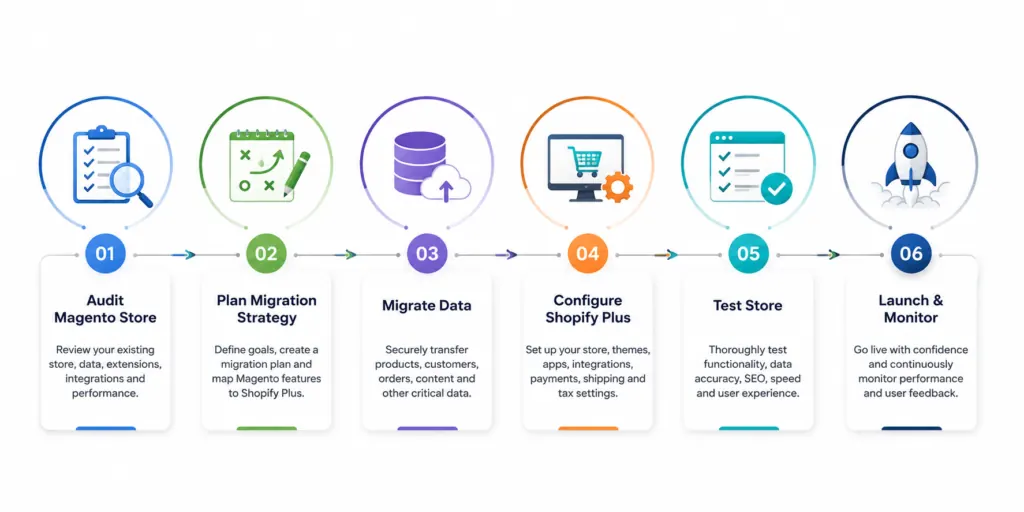
Magento to Shopify Plus migration roadmap from planning to launch
Phase 1: Pre-Migration Planning and Audit
A successful migration starts with a detailed audit of your existing Magento store.
Review Your Current Magento Store
Analyze:
-
Number of products and SKUs
-
Customer database size
-
Order history
-
Product categories
-
Custom Magento extensions
-
Third-party integrations
-
Payment gateways
-
Shipping configurations
-
SEO performance
-
Existing website traffic sources
Create a complete inventory of everything currently running on Magento.
Identify Migration Goals
Define what you want to achieve with Shopify Plus:
-
Better website speed
-
Improved conversion rates
-
Easier store management
-
International expansion
-
Better mobile experience
-
Reduced maintenance costs
Clear goals help determine the right migration approach.
Phase 2: Create a Data Migration Strategy
Data migration is one of the most critical parts of moving from Magento to Shopify Plus.
Data That Needs to Be Migrated
Your migration checklist should include:
Product Data
Transfer:
-
Product names
-
Descriptions
-
Images
-
SKUs
-
Variants
-
Pricing
-
Inventory information
-
Product attributes
-
Categories and collections
Magento attributes may require restructuring because Shopify organizes product data differently.
Customer Data
Migrate:
-
Customer names
-
Email addresses
-
Addresses
-
Customer groups
-
Purchase history
Note that customer passwords typically cannot be transferred directly because of platform security differences. A customer account activation or password reset strategy should be planned.
Order Data
Historical orders may be migrated for:
-
Customer support
-
Reporting
-
Warranty management
-
Business analytics
Content Data
Review and migrate:
-
Blog articles
-
Landing pages
-
FAQs
-
Policy pages
-
Media files
Phase 3: Shopify Plus Store Setup
Before moving live traffic, configure your Shopify Plus environment.
Configure Store Settings
Set up:
-
Store information
-
Currency
-
Taxes
-
Shipping rules
-
Payment methods
-
Checkout settings
-
Customer accounts
Choose the Right Storefront Approach
Businesses can choose between:
Shopify Theme Development
Best for brands looking for:
-
Faster implementation
-
Lower development complexity
-
Easy content management
Headless Commerce
Best for brands requiring:
-
Highly customized experiences
-
Advanced frontend flexibility
-
Complex customer journeys
The right approach depends on your business goals and technical requirements.
Phase 4: Rebuild Magento Features on Shopify Plus
Magento stores often depend on extensions and custom development. Each feature needs to be reviewed before migration.
Extension and App Mapping
Create a list of Magento extensions and find Shopify alternatives for:
-
Reviews
-
Loyalty programs
-
Subscriptions
-
Search functionality
-
Product filtering
-
Marketing automation
-
ERP integration
-
CRM integration
Do not assume every Magento feature will work the same way on Shopify Plus. Plan replacements early.
Phase 5: SEO Migration Checklist
SEO preservation is one of the biggest concerns during ecommerce migration.
A poorly planned migration can impact search rankings and organic traffic.
Maintain URL Structure
Magento and Shopify use different URL formats. Create a complete URL mapping document.
Checklist:
✓ Export all existing URLs
✓ Identify high-ranking pages
✓ Create Shopify URL equivalents
✓ Set up 301 redirects
✓ Remove unnecessary broken pages
Transfer SEO Elements
Migrate:
-
Meta titles
-
Meta descriptions
-
Image alt text
-
Canonical tags
-
Structured data
-
Internal links
Monitor Search Performance
After launch:
-
Check Google Search Console
-
Monitor crawl errors
-
Review ranking changes
-
Fix broken redirects quickly
Phase 6: Design and User Experience Migration
Your migration is an opportunity to improve the customer experience.
Review:
-
Homepage design
-
Navigation structure
-
Product pages
-
Search experience
-
Checkout flow
-
Mobile responsiveness
-
Conversion elements
Focus on creating a fast and intuitive shopping journey.
Phase 7: Integration Setup
Enterprise stores usually depend on multiple connected systems.
Review and reconnect:
Business Systems
-
ERP
-
CRM
-
PIM
-
Warehouse management systems
-
Inventory platforms
Marketing Tools
-
Email marketing platforms
-
SMS tools
-
Customer loyalty platforms
-
Analytics solutions
Payment and Shipping Providers
Test:
-
Payment authorization
-
Refund processing
-
Shipping calculations
-
Tax handling
Phase 8: Testing Before Launch
Never launch a migrated store without complete testing.
Functional Testing Checklist
Test:
✓ Product browsing
✓ Search functionality
✓ Filters
✓ Add-to-cart process
✓ Checkout flow
✓ Payment processing
✓ Discount codes
✓ Customer accounts
✓ Order confirmation emails
Performance Testing
Check:
-
Page speed
-
Mobile performance
-
Image optimization
-
Core Web Vitals
User Acceptance Testing
Allow internal teams to test:
-
Admin workflows
-
Order management
-
Customer service processes
-
Reporting dashboards
Phase 9: Migration Launch Plan
A successful launch requires careful coordination.
Prepare a Cutover Plan
Include:
-
Final Magento backup
-
Data freeze period
-
Final data migration
-
DNS update
-
Redirect activation
-
Monitoring process
Launch During Low-Traffic Periods
Choose a launch window when:
-
Customer activity is lower
-
Technical teams are available
-
Support teams can respond quickly
Phase 10: Post-Migration Monitoring
The work does not end after launch.
Monitor:
Technical Performance
Track:
-
Errors
-
Broken links
-
Checkout failures
-
Integration issues
SEO Performance
Monitor:
-
Organic traffic
-
Keyword rankings
-
Indexed pages
-
Redirect performance
Business Metrics
Compare:
-
Conversion rate
-
Average order value
-
Revenue
-
Customer engagement
Common Magento to Shopify Plus Migration Mistakes
1. Migrating Without Data Cleanup
Moving outdated products, unused customers, and unnecessary content creates extra complexity.
2. Ignoring SEO Redirects
Missing redirects can lead to ranking drops and broken customer journeys.
3. Not Testing Integrations
ERP, payment, and shipping issues can impact operations immediately after launch.
4. Treating Shopify Like Magento
Shopify Plus has a different architecture. Rebuilding the same Magento structure without optimization can limit the benefits of migration.
5. Launching Without Proper Testing
Small issues during checkout or order processing can create major revenue problems.
Final Magento to Shopify Plus Migration Checklist
Before going live, confirm:
✅ Magento store audit completed
✅ Migration strategy finalized
✅ Product data migrated and verified
✅ Customer data transferred
✅ SEO redirects created
✅ Store design approved
✅ Apps and integrations configured
✅ Payments tested
✅ Shipping tested
✅ Checkout tested
✅ Analytics installed
✅ Team trained
✅ Post-launch monitoring plan ready
Conclusion
Magento to Shopify Plus migration is a strategic ecommerce transformation and a key part of Custom eCommerce Replatforming that can improve scalability, efficiency, and customer experience when executed correctly.
The key to success is detailed planning, accurate data migration, SEO protection, thorough testing, and continuous monitoring after launch.
By following this Magento to Shopify Plus migration checklist, businesses can reduce risks, protect existing revenue streams, and build a stronger foundation for future ecommerce growth.